livechat

显示标签为“print head”的博文。显示所有博文

2017年8月10日星期四

How to Clean Your Ricoh Print Head in A Right Way?

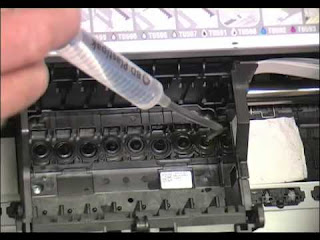
  Hi, Nice to see you again. In you usage of the digital printer, you must face a problem----The block of your print head. Then in the last article I have share you some tips that in which situation you print head would be blocked and how can you clean your print head in a right way. But sometimes, with the different print head you should take the different ways to clean it. Today I will show you the steps about how to clean your Ricoh print head in a right way.
  From the overall structure of Ricoh print head, we can see that it has two filters and two exhaust pipes on a Ricoh print head, and one print head has two color channels. It is to say, one filter and one exhaust pipe control one color channels. Next let's have a look about the specific steps about clean the print head.


Step 1: Remove the whole print head (including filters) from the UV printer and unscrew the plug of one exhaust pipe.


Step 2: Use a syringe to draw cleaning fluid and inject the fluid into the print head from filter on the same side of the exhaust pipe. The cleaning fluid and ink will flow out from the exhaust pipe opened.

Step 3: Repeat the above operations times times until the liquid flowing out is transparent

Step 4: Draw a tube a air and inject it into the same filter, and then screw on the lid of the exhaust pipe after the residual liquid is discharge.

Step 5: Draw cleaning liquid and inject it from the same filter, and the cleaning liquid will flow from the nozzles this time.

Step 6: After the liquid that flows from the nozzles becomes transparent, and then inject air the filter to discharge the residual liquid, just like the way above

Step 7: Clean the another print color channel with the same method.

Step 8: After the cleaning is finished, clean the print head surface with a clean dust-free cloth.

Note:During the cleaning process, don’t let the cleaning liquid contact with the plug of the nozzle cable.


  Okay, These all above is my introduction about how to clean the Ricoh print head in a right way. If you have any questions or some better suggestions welcome to contact us at any time. We will provide you with the best quality product and service. Hope my article can be useful to you. Thank you for your reading.


Nanjing Feiyue paper Industrial Co.,ltd
www.heatsub.com
Facebook: Zeo
Whatsapp:+8618752006819
Skype:+8618752006819

2017年7月16日星期日

Some Tips about The Print Head That You Should Pay Attention to

  Hi, Nice to see you again. How is your weekend going ?  All of you must know that the print head is one of the most important part of the digital inkjet printer. The quality of the print head can directly depend the printing solution of the pattern. Then do you know how can we test the new print head of your printer in a right way ? Read the following articles and you will know more details.

The following seven methods can be tested:

  1. In the trial before the print head, with a needle to test the print head to see if the plug. This is a very superfluous, and dangerous practice, first of all, once the print head into the water, you do not get dry on the machine power, ranging from burning board, while the head is burned; print head generally play a protective solution, you use the syringe into the head , Not only washed away the protection of the head of the liquid, and because the hand pressure is too large, likely to cause print head air block, resulting in no ink;
  2. The head of the print head is very fragile, absolutely can not bump, do sure to protect. Its surface is a piece of aluminum, the inner layer coated with a crystal oscillator and very small ink tube. A touch will be concave, deformation, and even broken, so that the print head on the scrapped;
  3. When installing the print head should also be careful, must first power, and installed in place. After the installation, the hand gently push the car around the move, check whether it is smooth, do not install the power on, because, if the head is not in place, a car is easy to head to hit the broken, and the staff feel, , Controllable strong;


  4. plug the cable, do not bring the ink, but also to ensure good contact with the socket, do not touch the foot, otherwise, will cause the print head short-circuit burned;
  5. Steel shaft should be clean and smooth, paper towels can be used to wipe the sticky oil, do not directly to the shaft refueling, the excess oil will flow to the print head up, causing damage;
  6. mechanical, the circuit is correct, it is necessary to test the waterway, and first look at the ink within the ink tank enough; Second, check the small clean blade, suction pump is dirty;
  7. Just installed on the print head inside the air, so it will not print immediately, only the head of the air completely discharged before the normal line out; specific steps are as follows:
  First of all, can be used intermittent cleaning (cleaning only 2 times, and then stop after 30 minutes and then wash 2 times) repeatedly washed too much, will cause the cleaning pump ink, not only will print color, ink leakage, but also a waste of ink ;
  Second, you can print more pictures, so that the print head in the work of the air;
  Once again, if the machine has been led to the waste ink tube, you can first power, and then set a rubber tube with a rubber tube to suck the waste ink tube, until the extraction of 3-5 ML ink so far, and then boot, with the machine normal cleaning time, Artificially to the head of the air to the hard out, the side effect is likely to cause cleaning pump heap.


  Okay , These all above is my share about the print head. If you have any needs or 
questions welcome to contact us at any time. We can provide you with the high quality DX-5, DX-6,DX-7,Canon, GEN-5 etc print head also with the good service. Hope this article can be useful to you. Thank you for your reading.


Nanjing Feiyue paper Industrial Co.,ltd
www.heatsub.com
Skype:+8618752006819

2017年7月6日星期四

Do You Know How to Clean Your Print Head in A Right Way If it Blocked ?

  Hi, Glad to see you again. In the last article I have shared you that what aspects may blocked your print head. And in order to complete the problem s about the print head of the digital inkjet printer. Today I will also introduce you some ways about how to clean your print head if your print head is blocked.


  After the cause of the blockage can be cleaned up in accordance with the following steps: 
  
  A. ready to clean liquid and tool 

  B. the print head out, remove the inner box, unplug the power (do not shut down to unplug the power, so you can put off the printer ) 
  C. with one of the silicone tube into the print head of the small Zhu on the top pumping   
  D. and then take another hose suction 3-5ML cleaning fluid, forced into, pay attention to the two red frame in the cleaning fluid into the Do not spit out the cleaning fluid.
  E. over 15 minutes in the installation of no problem with the supply or cartridge problem to solve. 


  Note: the block can be a serious repeat can be repeated above the operation of this method to treat the same as the stripes effective hot bubble print head if the slight block, do not remove print head, the print head reversed up, in the print head array on the drop of 3-5 drops of cleaning fluid, 5-10 minutes after the suction pump with suction ink, test print. For the old jamming of the old jet nozzle, you can use the cleaning solution soak the print head part of 24 hours (to avoid soaking the circuit contact part), with suction pump suction suction, the machine test print.

  If your print head is the piezoelectric print head you can also try another way. Just like the way above.We all know that Piezoelectric print head is a long-life design of the print head, in addition, due to the print head manufacturing technology reasons, the nozzle aperture larger, no heating elements, generally not easy to plug. So if there is a more serious plug, you should consider immediately replace the ink, because this ink is simply unworthy called ink. The ink can be replaced, blocked the print head can try to use cleaning solution. If you can easily remove the print head, you can soak the print head down in the cleaning solution, do not soak the circuit board. Not more than 30 minutes, with a syringe to absorb 20 ml of cleaning fluid, toward the print head out of the direction of ink out. Finally, wash with pure water, install the test print head. Think about it, even the piezoelectric print head can clear pass! Of course, from the choice of ink, you should use a good product, the origin of the ink must be used with caution but also pay attention to the operation of the ink cleaning and sealing. In the actual print production, there may be a variety of other factors lead to disconnection, lack of color or even ink.


  These all above is my share about ways how to clean your print head. Of course if you have any other ways or the better suggestions welcome to contact us at any time and we promise to provide you with the best quality product and service. We are a professional sublimation printing and transferring material in China and we have 10 years experience in this industry. Waiting for your connection. Thank you for your reading.


Nanjing Feiyue paper Industrial Co.,ltd
www.heatsub.com
Skype:+8618752006819
Whatsapp:+8618752006819

2017年7月5日星期三

Pay Attention to The Following Tips That May Block Your Print Head !

  Hi, Nice to see you again. In the last articles I have mostly shared you some problems about the sublimation transfer paper and how to solve the problems about them. Today I will share you something new. You must know that the most important part of the digital inkjet printer is just the print head. So in case of the block of the print head happen, people may buy the high quality inkjet ink. But only in this way is not enough, read the following article and you will know that the general will appear in the following cases of  "blocking" print head:


  1. Dirty plug, this plug is generally scraper failure dirt, long-term use of paper paper caused by poor quality.

  2. Debris plug, which is the tiny pieces of ink into the print head plug in the ink mouth.

  3. Filter plug long-term use of poor quality ink, the ink in the larger material and harmful solvents will be blocked in front of the filter, a long time will be blocked.
  4. Dry knot, often in a long period of time do not have to cause.

  5. Chemical plugs, often using a different nature of the ink caused by chemical reactions, causing the jelly to block the print head.

  6. Bacterial corrosive plug: This type of plug often occurs in the temperature above 20 degrees, the bacteria in the ink a lot of breeding, resulting in
degeneration of ink, in the nozzle inside the flocculent corrupt substances.

  7. Scaling plug: As part of the ink manufacturing process of improper handling of water, water-based, long-term use of mineral minerals in the water will scale in the print head, resulting in print head diameter becomes smaller, often from the printed goods have stripes start

  8. Oil-based plugs, ink vehicles need lubricants, and sometimes lubricants will spread to the print head, changing the physical properties of the print head , resulting in similar phenomenon of plug.

  9. Electrical plug, and some printer print head set the ink or cartridge chip electrical
performance testing, when the detection of non-standard ink or chip, it will be different degrees to close the ink valve, so that the nozzle can not normally through the ink, such blocking First known as false plug.

  10. Gas plug, some ink defoaming performance is not good, in the ink will produce bubbles, but once the bubble into the print head, it is difficult to come out, causing gas block.
 

  These above is my summary about some cases that may block or plug the print head. Then I will share you some new ways about how to solve these problems if your print head is blocked in the nest article. If you have any questions or some other better suggestions welcome to contact us at any time.
  We are a professional sublimation digital inkjet printing and transferring material manufacturer in China. We can prove you with the high quality sublimation printing materials, such as the sublimation ink, sublimation paper, sublimation inkjet printer and the rotary heat press machine. Hope this article can be really useful to you. Thank you for your reading.


Nanjing Feiyue paper Industrial Co.,ltd
www.heatsub.com
Skype:+8618752006819
Whatsapp:+8618752006819
Email: zeo@feiyuepaper.com